
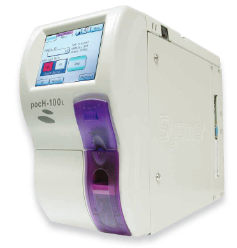
Configuration Stages
To configure the Sysmex pocH-100i to connect to Relaymed the following configuration stages are required:
- Sysmex pocH-100i Host Output Configuration.
- Connection Configuration of Sysmex pocH-100i.
- Add device to the Relaymed Link or Relaymed Software Agent.
Stage 1: Host Output Configuration
Step 1: From the Sysmex pocH-100i Home screen press the "Menu" button.
_pochHome__1_-png.png?width=447&height=331&name=Sysmex%20pocH-100i%20Configuration%20Guide%20()_pochHome__1_-png.png)
Step 2: From the Main Menu press the "Settings" button.
_pochMainMenu__1_-png.png?width=445&height=350&name=Sysmex%20pocH-100i%20Configuration%20Guide%20()_pochMainMenu__1_-png.png)
Step 3: From the Settings Menu, press the "Host Output" button.
_pochHostOutput-png.png?width=466&height=356&name=Sysmex%20pocH-100i%20Configuration%20Guide%20()_pochHostOutput-png.png)
Step 4: On the "Host Output" screen configure the following options:
Note: To access additional options use the "Left Arrow" buttons.
- Connect: LAN
- Automatic Output: Enable
- Format: ASTM
- ASTM Rev: 1381-02
Step 5: Press "Save" to store the "Host Output" configuration.
Stage 2: Connection Configuration
Step 1: From the Sysmex pocH-100i Home screen press the "Menu" button.
_pochHome__1_-png.png?width=502&height=372&name=Sysmex%20pocH-100i%20Configuration%20Guide%20()_pochHome__1_-png.png)
Step 2: From the Main Menu press the "Settings" button.
_pochMainMenu__1_-png.png?width=483&height=380&name=Sysmex%20pocH-100i%20Configuration%20Guide%20()_pochMainMenu__1_-png.png)
Step 3: On the "Network" screen configure the following options:
_pochNetwork-png-1.png?width=508&height=396&name=Sysmex%20pocH-100i%20Configuration%20Guide%20()_pochNetwork-png-1.png)
Note: To access additional options use the "Left Arrow" buttons.
- pocH-100i configuration:
- IP Address: Static IP address allocated to device.
- Subnet Mask: Appropriate mask for your network.
- Default Gateway: Appropriate gateway for your network.
- Host configuration:
- IP Address: Static IP address allocated to Relaymed Software Agent host.
- Port Number: Port used to communicate with Relaymed Software Agent.
Step 4: Press "Save" to store the "Host Output" configuration.
Step 5: Check an Ethernet cable is connected to the device and an available network port.
** If you run into connectivity issues change mode to half-duplex instead of full-duplex.**
Stage 3: Add Device to Relaymed Link or Relaymed Software Agent
For practices using the Relaymed Link, log in to your Relaymed Portal and follow these steps:
Adding a Device to Relaymed Link
For practices using the Relaymed Software Agent, open the server or PC where the agent is installed and follow these steps:
Adding a Device to Software Agent