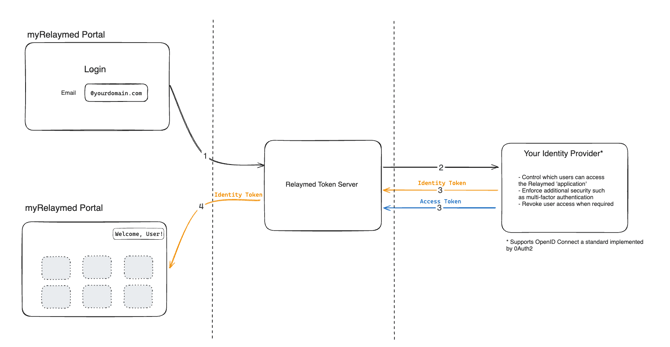
Relaymed supports single sign-on (SSO) using OpenID Connect (OIDC). This allows your IT team to manage Relaymed access through your existing identity provider. We integrate with Microsoft Entra ID (formerly Azure AD), Okta, and other OIDC-compliant providers. Once configured, your users can sign in to Relaymed using their existing organizational credentials, and your security policies such as multi-factor authentication and conditional access will apply automatically.
Microsoft Entra ID (Azure AD)
If your organization uses Microsoft Entra ID, setup can be completed without a call. There is no need to create an application in your Azure environment - your Azure administrator simply needs to grant consent to our multi-tenant app.
See Setting Up SSO with Microsoft Entra ID for full setup instructions.
Other OIDC Identity Providers
We support any identity provider that implements the OIDC specification, including Okta, OneLogin, and others. For non-Azure providers, we recommend a short call (approximately 30 minutes) between our IT teams to walk through the configuration and verify the integration is working.
See OIDC Technical Requirements for Non-Azure Identity Providers for full technical requirements.
Email Domains
When setting up SSO, we need to know the email domain(s) your users will sign in with - for example, yourcompany.com.
- If your organization uses more than one email domain, please let us know so we can configure all of them.
- When inviting users in the Relaymed portal, use the same email domain that has been configured for SSO.
- If your organization has email domains that differ from the domain your identity provider returns, let us know during setup so we can make sure everything is aligned.
How Does It Work?
When a user with SSO logs in to the myRelaymed portal, our authentication system redirects them to the identity provider associated with their organization. The user authenticates as they normally would, which may include multi-factor authentication or other security prompts. Once successfully authenticated, two tokens are returned to our system:
- Identity Token - contains basic information about the user (email, name) and is used to display personalized information while logged into the portal.
- Access Token - stored internally in our system, proving the user's identity and used to secure further requests.
At no point does Relaymed see or store the user's password. Authentication is handled entirely by your identity provider.