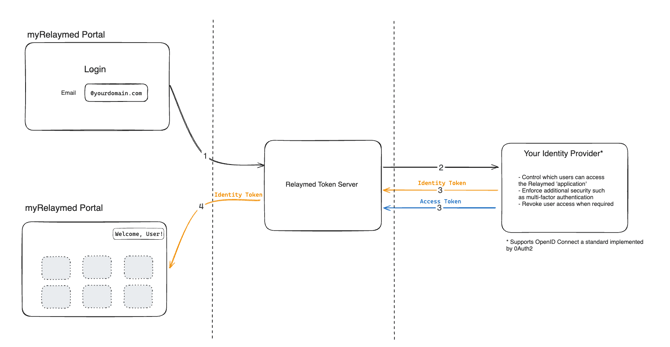
Logging into the myRelaymed portal should seamlessly integrate with your internal workflows and tools. Relaymed can be centrally controlled by your IT and security team to ensure smooth onboarding and offboarding processes for every employee. By implementing single-sign-on (SSO) functionality, users can access the application without the hassle of remembering multiple passwords, resulting in a more streamlined login experience.
Relaymed stores sensitive ePHI information related to your in-house testing programs, and we prioritize top-grade cloud security measures to safeguard this data. To uphold these standards, our solution supports OpenID Connect (OIDC), the current industry-standard process for authenticating users with third-party services. By choosing OIDC, we can seamlessly integrate with a variety of user management systems, including Microsoft Azure Entra (formerly Azure AD) and Okta.
Setting up myRelaymed for SSO with your chosen identity provider is straightforward, ensuring you can maintain the same high security standards within your organization. Once configured, you'll have the flexibility to control which users can access myRelaymed via single sign-on and manage access controls such as multi-factor authentication through your user management system.
Setting up SSO
To link your identity provider with Relaymed, we will complete the following steps.
Using Azure as your identity provider
- Send us a list of email domains used for sso, i.e yourcompany.com and your Azure AD Tenant Id
- We will send back an admin consent URL for your Azure administrator to click and authorize
- That’s it! You are now configured for SSO. Go to the users section at https://portal.myrelaymed.com to add and configure users for your organization.
Using a different OIDC identity provider
- While we support any identity provider that implements the OIDC spec, we recommend organizing a call between our IT teams if it is a service other than Azure. This is to ensure the integration is tested and working, and allow us to fix any issues on the call. This should take approx 30 mins.
On the call, we will require some information:
- A list of the email domains that your users login with, as an example @RELAYMED.COM
- The Authority URL (including a tenant Id if necessary), and a Client Id from your OIDC identity provider
- A generated secret that is specific to the Relaymed application (to be sent securely)
- Setting app redirect URLs
- Configure the OIDC Identity Token that is sent to us from your identity provider, we require the following claims:
- sub (the remote unique GUID/identifier for the user)
- email (Email)
- family_name (Family name)
- given_name (Given name)
- Once set up, we verify the SSO login process is working with a user from your organization.
How does it work?
When a user with SSO logs into the myRelaymed portal our authentication system sends a request to the identity prover associated with the user. The user logs into the system as they would do normally with other applications, which may include Multi-Factor Authentication prompts or other security protocols. Once successfully authenticated, two tokens are returned to our system:
- The Identity Token has some basic information about the user (email and name) and is used to display personalized information while logged into our portal
- The Access Token is stored internally in our system, proving that the user is who they say they are and is used to secure further calls in our system