
The Lot Reference Ranges feature lets users set up and manage reference ranges for quality control (QC) tests. This ensures test results are accurate by comparing them against predefined acceptable reference ranges or target values.
Set up:
After running a QC test, the result appears in the QC section of the portal. If the device doesn’t provide us with lot details, enter the reagent lot number and the level, then click “Lot Reference Ranges” to add the configuration.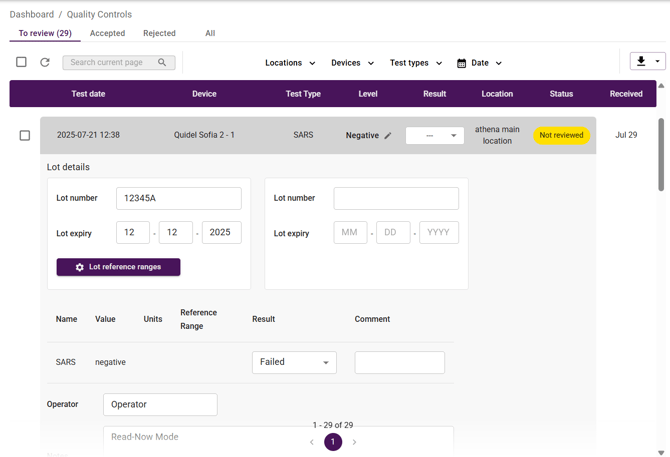
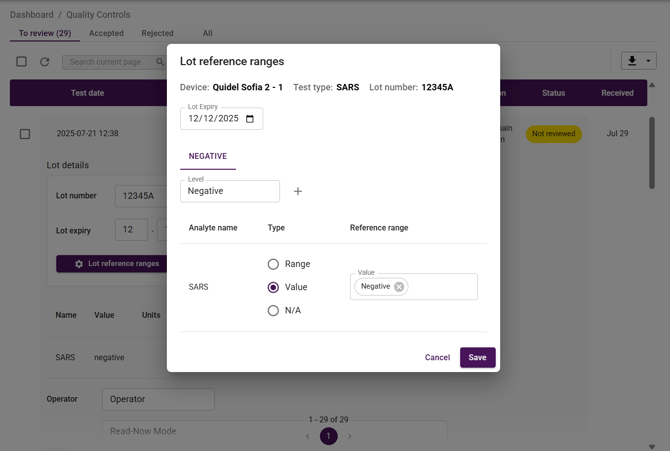
Enter the lot expiry and reagent lot reference ranges, add multiple levels using the + button if needed, and then click Save.
Notes:
-
The QC results will still be calculated even if the lot is past its expiry date. This is intentional, the portal will show a visual warning to let users know the material is expired and needs to be updated.
-
If the expected value from the device can included a comparison symbol (such as <, >, ≤, or ≥), the range can be added in multiple ways.
-
For > or ≥, enter a range only in the Low Range field.
-
-
-
For < or ≤, enter a range only in the High Range field.
-
If both range fields are completed, the analyte result will be calculated without the comparison symbol.
-
If the range consists of specific set values, you can enter multiple values in the value type field. For example, if the QC passes when the range is between ≤1.005 and 1.010, but the device outputs discrete values (≤1.005 or 1.010), these individual values can be listed in the value type field.
-