
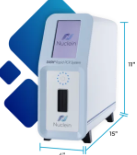
Stage 1: Contact Nuclein
To connect to Relaymed, you must first be set up on the Nuclein portal, accessible via Wi-Fi or Ethernet cable.
- Not yet using the Nuclein portal? Contact the manufacturer to get started.
- Already using the Nuclein portal? Reach out to the manufacturer and let them know you'd like to connect to Relaymed. They will provide you with a unique customer ID, which can be used to connect all of your DASH instruments.
Stage 2: Add Device
In the myRelaymed portal, Navigate to Device Connectivity >> Add Device
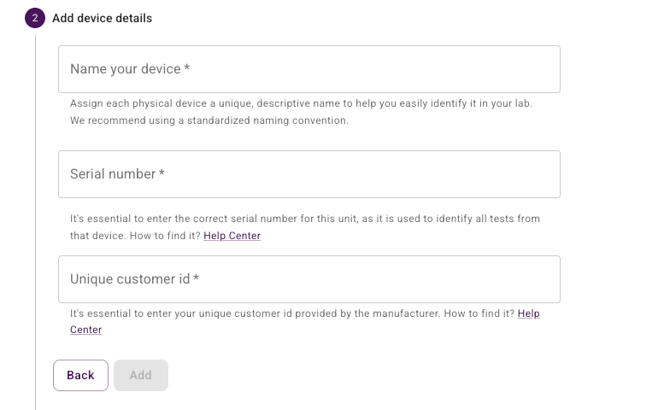
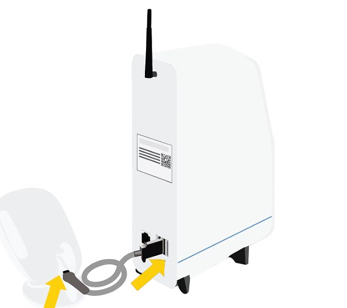
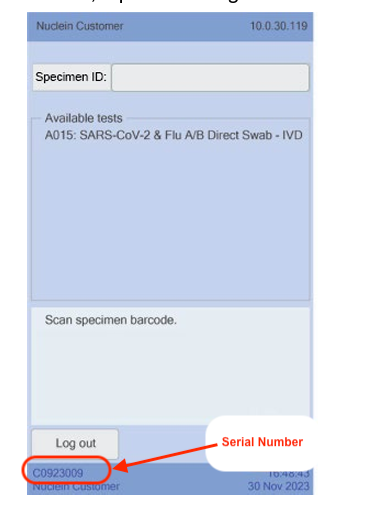
Serial Number can be found:
- At the back of the instrument, OR
- At the bottom left corner of the DASH screen
Stage 3: Test the connection
-
Once one unit is added, test the connection by running a new test -- it should appear in the myRelaymed portal
Note: this device is not capable to recall an old test from its memory
Notes: Additional devices
-
If you have multiple Nuclein DASH units, make sure you add each unit separately in the myRelaymed portal.
-
Use each unit unique Serial Number.
-
Your Customer ID can be use across all units you connect.