
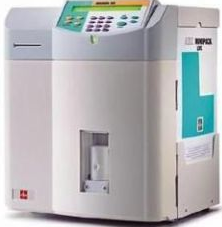
Configuration Stages
To configure the Horiba ABX Micros 60 to connect to Relaymed the following configuration stages are required:
- Horiba ABX Micros 60 Connection Configuration
- Lantronix xDirect Adapter Configuration
- Add device to Relaymed Link and Relaymed Software Agent.
Stage 1: Connection Configuration
Step 1: From the Horiba ABX Micros 60 "Main Menu" select "5 - Setup".
Step 2: From the "Setup Menu" select "5 - Host options".
Step 3: From the "Host options" Menu select "1 - Host Comm".
Step 4: From the "Host Comm" options select "3 - Format ABX".
Step 5: From the "Host options" Menu select "2 - Baud Rate".
Step 6: From the "Baud Rate" options select "5 - 9600".
Stage 2: Lantronix Configuration
Step 1: Connect the Serial to Ethernet Adapter to the directly to the RS232 Port.
Step 2: Follow the Serial to Ethernet Adapter configuration guide to correctly configure the adapter to connect to your network.
Stage 3: Add Device to Relaymed Link or Relaymed Software Agent
For practices using the Relaymed Link, log in to your Relaymed Portal and follow these steps:
Adding a Device to Relaymed Link
For practices using the Relaymed Software Agent, open the server or PC where the agent is installed and follow these steps:
Adding a Device to Software Agent
Troubleshooting
If the device's U and V identifier fields swap unexpectantly the patientID will start coming through in the sampleID field and vice versa. There is a setting where you can switch the parameters back.