
Step 1: Add device to the Relaymed Link or Software Agent
For practices using the Relaymed Link, log in to your Relaymed Portal and follow these steps:
Adding a Device to Relaymed Link
For practices using the Relaymed Software Agent, open the server or PC where the agent is installed and follow these steps:
Adding a Device to Software Agent
Step 2: Connect device to the network
- Connect the Male-to-Male Null Modem adapter to the device and to the Serial to Ethernet Adapter
- Connect the Adapter to the RS232 Port on the rear of the device
- Follow the Serial to Ethernet configuration guide to correctly configure the adapter, however, make sure to set the Baud Rate on to 19200 (Non-Standard Baud Rate) on the Serial to Ethernet adapter.
Step 3: Setup the device
Ensure the Interface is enabled
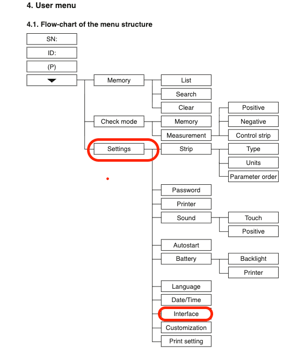
- On the Home Screen press the Solid Down Arrow
- Select Settings
- Select Interface
- Set to On
- Select Tick to Save
Step 4: Send a test through
To verify the setup works send a test from the device to Relaymed.
Troubleshooting
If client is having issues with the test showing the following error:
An error occurred attempting to parse the payload
The device may not be configured correctly, so the following steps may help:
1. Henry Schein Urispec
- Verify Strip Mode
- Found via Settings → Strip → 11-Way
2. Relaymed Software Agent (RSA) or Relaymed Link
- Changed the assigned port number to another port number far away from the port range that is currently being utilized.