Before you Start:
The BioFire Film Array connects directly to Relaymed cloud and doesn't require the Relaymed Link. Follow the setup steps, then contact BioFire to arrange an engineer visit and verify the connection.
Stage 1: Add Device to the Relaymed Portal
Step 1: Add your device
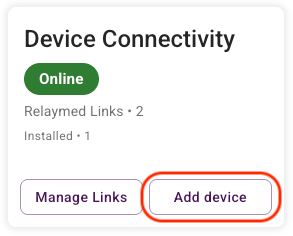
Device connectivity >> Add device
-
Select location
-
Manufacturer: BioFire
-
Device: Biofire FilmArray
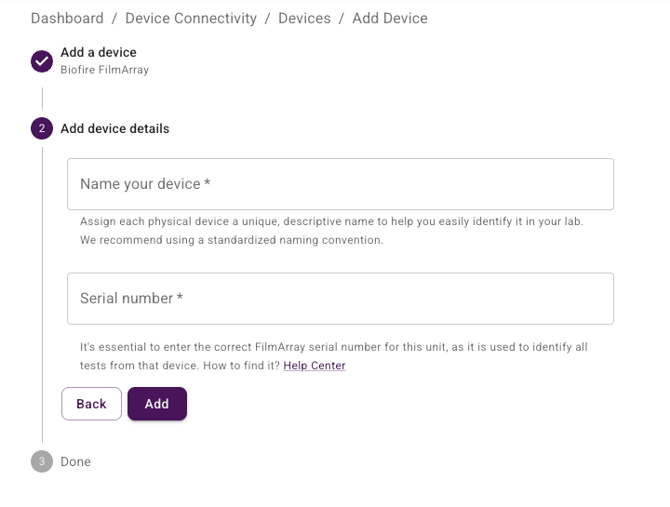
Step 2: Add Device details
Serial Number: It is essential that the correct serial number is entered for each unit.
Step 3: Get your unique device connection details
You will get your unique connection details in this format:
https://process.myrelaymed.com/<your org ID>/<device serial number>To connect this device, contact BioFire to arrange an engineer visit. BioFire requires one of their field engineers to configure the device for connectivity. When the engineer is onsite, share your unique URL with them to complete the setup.
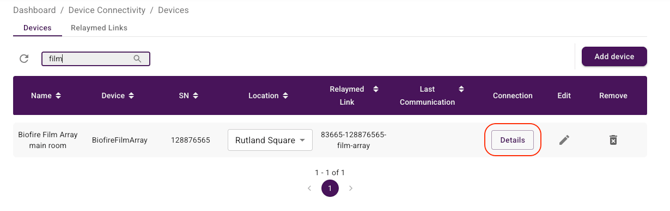
You can retrieve your connection details at anytime from the Devices page: